…in the Email Classifier Solution Project
DistilBERT Transformer
The classification model is a DistilBERT transformer. DistilBERT is a condensed version of the Google’s BERT transformer. DistilBERT, with 66 million parameters, is a fraction of the size of large GPT models: GPT-4 and Grok4 at (estimated) 1.7 trillion parameters are 25.000 times larger than DistilBERT. And yet, DistilBERT performs well for text classification tasks and can do so while running locally on a relatively ordinary PC.
Training Pipeline
The training pipeline is written in Python with PyTorch, consisting of command line utilities to encode training data and to do actual training runs. A dictionary file defines categories and subcategories, configuring training heads accordingly. Training runs are parameter-driven. A training config file contains hyperparameters to optimize. A number of common training optimization techniques are available to use. Performance metrics and realtime parameters are logged extensively for analysis. A training run tracks a best model epoch and creates per-epoch visualizations. Best-model checkpoints are saved with rich state data to allow for fine-tuning later.
Utility App
The utility app provides means to run evaluations, to check and track model performance, to organize samples, to collect data for future training runs, and to curate routing rules.
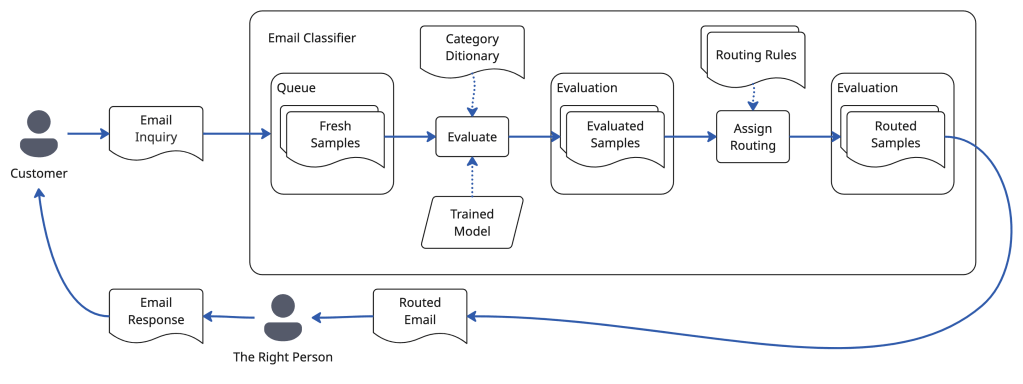
Samples, Queue, Batches
When an email comes into the app, it becomes a sample. The app uses batches to allow the user to organize samples. The queue is a special batch that contains all the samples that are ready to be processed by the model. The app performs evaluation runs, handing the samples in the queue to the inference pipeline, where the model evaluates the samples, assigning classifications. The evaluated samples are moved to an evaluation batch, where routing rules can be applied, to determine whom to send the email to.
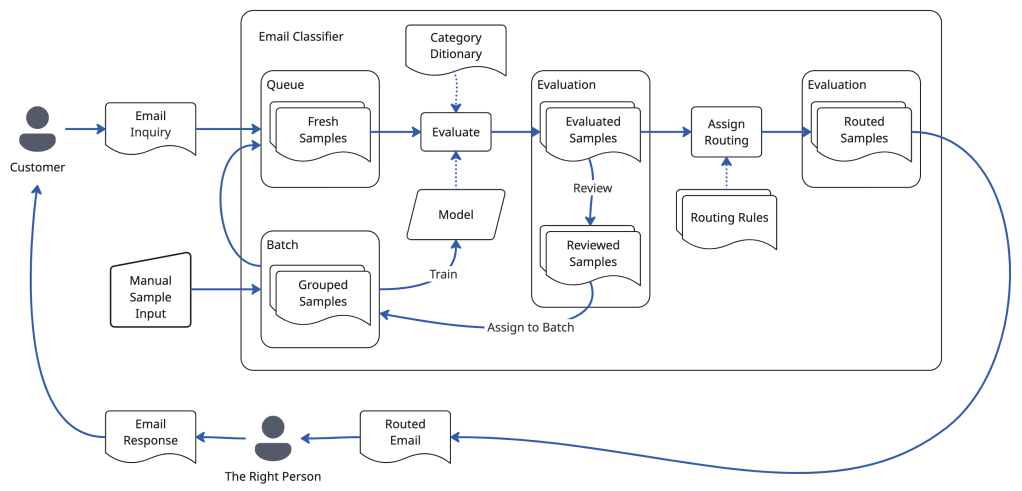
Validation & Manual Review
Samples come with or without validation data, to check if the model classifies a sample correctly. Samples in production (actual emails written by people) do not have validation data. Samples that are LLM-generated using the training-data generation process, and manually authored samples, have validation data. When a model evaluates a sample with validation data, its performance is captured: did it get it right?
Any sample without validation data that is evaluated (classified) by the model can be manually reviewed. The reviewer approves the model’s evaluation of the sample or assigns corrections. The manual review then provides validation data for future model training.
Model performance is accumulated and tracked across all evaluated samples with validation data and with manual review data.
Utility App Tech Stack
The user-facing utility app is python using SQLite, Vite, React and PyTorch to run inference. To allow room to grow, the app has abstraction layers to replace SQLite with a more sophisticated database and to replace locally-run inference with an API-driven solution. The front end uses Ant Design with a token-based design system.
“Crawl” State
In the crawl of the app, there is no integration with external email systems yet, but the API is ready for an integration with a workflow automation system like N8N, which connects to email systems. In a large-scale production deployment, a dedicated data ingestion bridge to connect to an email server may be more advisable.


Process
I use Cursor, Claude, Claude Code and other LLM tools to inform technology choices, toe explore architecture options, to build, and to generate training data.
The project complexity is well beyond “vibe coding scale”. I follow a “one-person product organization” approach, relying on documentation-driven process, step-by-step implementation and testing. I start with notebook sketches, write PRDs, design documents (some just by myself, some in dialog with an LLM), architecture documents, plans, and then prompts.

React & Ant Design
For the front end, I chose React (as opposed to something more modern) since LLMs are well-trained on it. This was helpful both for prototyping screens and for the actual implementation. Ant Design is a great design system to use because it comes with robust enterprise grade features, such as flexible tables, which can otherwise be hard to deal with. Ant Design also offers a sophisticated design token system to keep CSS clean and simple.
UX Design Process
To design the UX, I bypassed sketching in Figma. After doing paper sketches and taking notes, I iterated on a PRD document and on a feature-by-feature UX specification supported by sample .json data files. These documents informed a series of prototypes in Cursor. A prototype then served as a reference for implementation. The implementation always gets refined too: nothing like running code to experience and optimize flow. Eventually it is good.
I also explored doing actual sketches with Figma’s First Draft feature and with Google Stitch, but did not like being stuck with dead-end drawings. These tools also had a harder time creating results with appropriate amount of detail and structure. Figma Make could have been another option, but I just stuck with my default tools to get the job done.
For what it’s worth: this page is 100% human-written.


 Graf Systems